As an Amazon Associate, we earn from qualifying purchases. Some links on this site are affiliate links at no extra cost to you. Our recommendations are based on thorough research and editorial judgment.

5 Best Small Business Scanner Solutions to Streamline Your Operations in 2026

In 2026, consider the Ambir DS687 for quick ID scanning, thanks to its compact design and duplex capability. The ScanSnap iX1600 offers fast, wireless scanning, boosting productivity at 40 pages per minute. For a portable option, the lightweight Epson WorkForce ES-50 scans a sheet in just 5.5 seconds. The Fujitsu ScanSnap S1300 combines one-button operation with high-resolution scanning, while the SOCKET S800 is perfect for barcode needs. Explore these options to find the right fit for your business operations.
Key Takeaways
- Choose compact and lightweight scanners like the Epson WorkForce ES-50 to save office space and enhance portability for remote work.
- Opt for models with duplex scanning, such as the Ambir DS687, for efficient processing of ID cards and multi-page documents in one pass.
- Utilize wireless and USB connectivity options, like the ScanSnap iX1600, for seamless integration with multiple devices and cloud services.
- Ensure the scanner has OCR capabilities to convert scanned documents into editable formats, improving document management and workflow efficiency.
- Invest in scanners with robust software support and user-friendly interfaces to reduce learning curves and ensure smooth operations in your business.
Ambir DS687 Duplex A6 Id Card Scanner
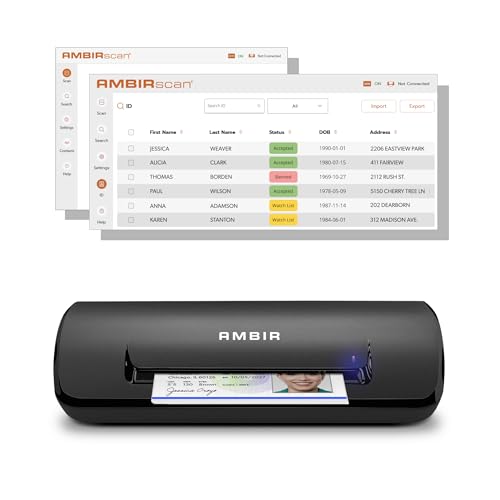
AMBIR ID Scanner with Card Scanning Software DS687 - Automatic Data Extraction for Age Verfication...
- Complete Turnkey Solution – Hardware and software included in a single purchase with no subscription fees or ongoing costs. Everything your small business needs to...
- Automatic Data Extraction – Reads 2D barcodes on all valid US and State Government issued IDs to instantly extract customer name, address, date of birth, and other key...
- Duplex Scanner - Scans both sides in a single pass.
You may be interested



The Ambir DS687 Duplex A6 ID Card Scanner is an excellent choice for small businesses needing efficient and reliable scanning solutions. With its compact dimensions of 2.6 x 7.99 x 1.69 inches and weight of just 11.2 ounces, it’s easy to place anywhere. This scanner captures both sides of ID cards in one pass, making it perfect for environments like healthcare and hospitality. Its 48-bit color depth guarantees crisp, clear images. While many users appreciate its performance, a few reported software integration hiccups. Overall, it’s well-built and designed for daily use, handling 20-30 scans smoothly.
Best For: Small businesses in healthcare, hospitality, and financial institutions that require efficient, reliable scanning of ID cards and documents.
Pros:
- Compact and lightweight design suitable for small office spaces.
- Effortlessly scans both sides of ID cards in a single pass.
- High-resolution imaging with 48-bit color depth for clear document captures.
Cons:
- Some users report software integration issues, particularly with duplex functionality.
- Duplex scans create separate files for front and back, which may be inconvenient for file management.
- Occasional feedback indicates software support could use improvement.
ScanSnap iX1600 Wireless Document Scanner

ScanSnap iX1600 Wireless or USB High-Speed Cloud Enabled Document, Photo & Receipt Scanner with...
- MANAGE HOME AND SMALL BUSINESS DOCUMENTS WITH EASE. Large color touchscreen; fast 40ppm duplex scanning; Wi-Fi and USB connectivity; photo scanning; and support for a...
- DOCUMENT MANAGEMENT AT YOUR COMMAND. Easily select your scanning destination with up to 30 scanning profiles. Send to PC, Mac, Chromebook, mobile devices and cloud...
- GREAT FOR YOU, GREAT FOR A TEAM. Users can select their profile from the touchscreen and access their personal shortcuts and destinations
For small business owners looking to streamline document management, the ScanSnap iX1600 Wireless Document Scanner is an excellent choice. It scans at an impressive speed of 40 pages per minute, allowing you to save time during busy periods. With wireless and USB connectivity, it’s easy to connect to any device or cloud service. The large color touchscreen simplifies navigation, supporting up to 30 scanning profiles for various needs. You’ll benefit from the included ScanSnap Home software, which offers high-quality PDF editing and organization. Though it has some software limitations, its overall performance makes it a valuable investment for efficient operations.
Best For: Small business owners looking to streamline their document management with a reliable and efficient scanner.
Pros:
- High-speed scanning at 40 pages per minute, greatly enhancing productivity.
- Wireless and USB connectivity allows for easy connection to various devices and cloud services.
- User-friendly interface with a large touchscreen and support for multiple scanning profiles.
Cons:
- Software may have limitations for manual controls compared to previous models.
- Challenges in saving multiple pages as separate files could necessitate additional software.
- Kofax PowerPDF Standard must be downloaded separately, with noted availability issues.
Epson WorkForce ES-50 Portable Sheet-Fed Document Scanner for PC and Mac
Sale


Epson Workforce ES-50 Compact Portable Single-Sheet-Fed Receipt and Document Scanner for Computers...
- PORTABLE SCANNER FOR USE ON-THE-GO — The fastest and lightest mobile single-sheet-fed compact document scanner in its class¹
- QUICK DOCUMENT SCANNING ― This Epson ultra-fast scanner scans a single page as quickly as 5.5 seconds²; Windows and Mac compatible
- VERSATILE PAPER HANDLING ― Portable scanner scans documents up to 8.5 x 72 in; Also easily digitizes receipts and ID cards to make accounting, bookkeeping, and...

When you need a reliable scanning solution that fits seamlessly into your mobile workflow, the Epson WorkForce ES-50 Portable Sheet-Fed Document Scanner stands out. Weighing just 9.4 ounces and measuring 1.8 x 10.7 x 1.3 inches, it’s easy to carry. This USB-powered scanner delivers documents in as little as 5.5 seconds. With Epson ScanSmart Software, you can effortlessly save scans as searchable PDFs or editable documents. While it scans up to 8.5 x 72 inches, keep in mind that it doesn’t support double-sided scanning. Overall, its user-friendly design and quick performance make it a top choice for small businesses.
Best For: Small businesses and professionals who need a lightweight and portable scanner for quick document scanning on the go.
Pros:
- Compact and lightweight design makes it easy to carry around.
- Fast scanning speed of up to 5.5 seconds per sheet enhances productivity.
- Includes user-friendly software for creating searchable PDFs and editable documents.
Cons:
- Does not support double-sided scanning, which may limit its functionality for some users.
- Potential issues with older macOS versions and driver compatibility.
- Mixed reviews on customer support, especially regarding driver problems.
Fujitsu ScanSnap PA03603-B005 S1300 Instant PDF Sheet-Fed Mobile Scanner

Fujitsu ScanSnap PA03603-B005 S1300 Instant PDF Sheet-Fed Mobile Scanner
- Fujitsu ScanSnap PA03603-B005 S1300I Premium Bundle. Fujitsu Advance Exchange - 1 Year Extended Service.
Looking for a compact and efficient scanner for your small business? The Fujitsu ScanSnap PA03603-B005 S1300 instant PDF mobile scanner could be your perfect solution. As the smallest Fujitsu multi-page duplex scanner, it offers one-button operation for seamless use. With an optical resolution of 600 dpi, your documents will maintain clarity and detail. It supports document sizes up to 8.5 inches by 14.17 inches, ideal for various paperwork. Powered by USB or AC, it’s versatile for any workspace. Plus, enjoy a one-year manufacturer warranty for peace of mind. Streamline your operations with this effective scanning tool!
Best For: Small businesses and individuals seeking a compact, efficient, and user-friendly mobile scanning solution.
Pros:
- One-button operation for easy use, perfect for users without technical expertise.
- High optical resolution of 600 dpi ensures clarity and detail in scanned documents.
- Compact design makes it easy to transport, ideal for mobile professionals.
Cons:
- Limited to a maximum document size of 8.5 in x 14.17, which may not accommodate larger documents.
- USB or AC powered only, which may restrict usage in areas without power outlets.
- The manufacturer warranty is only 1 year, which may not be sufficient for long-term reliability concerns.
SOCKET S800, 1D Barcode Scanner, Black
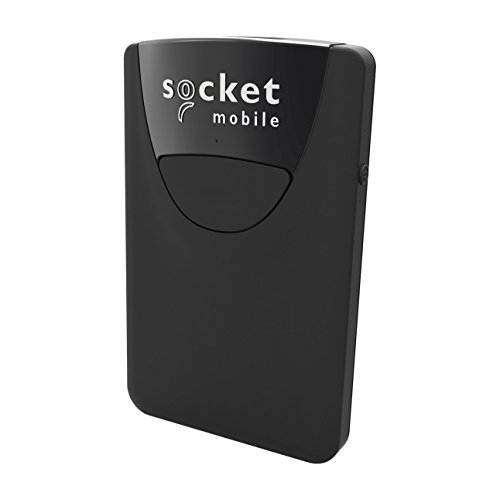
SOCKET S800, 1D Barcode Scanner, Black
- Apple MI Certified
- Scanner automatically connects to the last device or computer it paired and connected to
- Lanyard or a belt clip for convenient access are sold separate
The SOCKET S800, 1D Barcode Scanner in black is an excellent choice for small businesses that require efficient and portable scanning solutions. Measuring just 5.5 x 2 x 0.25 inches and weighing only 1.7 oz, it’s the lightest barcode scanner available. This device easily connects to Apple smartphones and tablets, allowing for flexible use. It scans damaged barcodes effectively and can recognize invalid codes, which improves your inventory management. Though the setup can be tricky, reliable support is available. Priced competitively, the S800 is highly rated by users for quick scanning, making it ideal for resellers and retail applications.
Best For: The SOCKET S800 is best for small businesses and resellers needing a lightweight and efficient barcode scanning solution.
Pros:
- Quick scanning capabilities enhance efficiency for retail applications.
- Lightweight design ensures portability for on-the-go use.
- Compatibility with Apple devices allows for flexible integration with smartphones and tablets.
Cons:
- Initial setup may be confusing for some users.
- Users report slow syncing with phones, which can hinder performance.
- Issues with beeping noise during operation have been noted by customers.
Factors to Consider When Choosing a Small Business Scanner Solution
When you’re choosing a small business scanner solution, you should focus on several key factors. Scanning speed and document compatibility can greatly impact your workflow. Connectivity options, software functionality, and portability also play crucial roles in ensuring the scanner meets your specific business needs.
Scanning Speed and Efficiency
Choosing the right small business scanner is all about speed and efficiency. Scanning speeds can vary, with portable models taking around 5.5 seconds per sheet, while high-speed options can handle up to 40 pages per minute. For busy environments, duplex scanning is a game changer, letting you scan both sides at once and cutting down the time needed for multi-page documents. It’s also important to support various document types, like business cards and receipts, to keep your workflow smooth. Look for user-friendly interfaces and touchscreen navigation, which can speed up operations and reduce downtime. Finally, keep in mind any limitations on saving multiple pages as separate files, as this can impact your efficiency considerably.
Document Compatibility and Types
Selecting the right small business scanner also involves understanding the types of documents you’ll regularly encounter. Consider if you’ll be scanning ID cards, receipts, or multi-page documents, as different scanners offer varying compatibility for these formats. Evaluate the maximum supported document size; some scanners only handle letter-sized documents while others can manage larger or longer items. Duplex scanning is another feature to look for, allowing simultaneous scanning of both sides of a document. This can boost efficiency, particularly with double-sided materials. Make sure the scanner can handle embossed documents too, which is essential in sectors like healthcare or finance. Finally, assess the speed—scanners with higher pages per minute (ppm) can greatly enhance your workflow.
Connectivity Options and Flexibility
Understanding connectivity options is essential for enhancing your small business scanner’s performance and flexibility. Look for scanners with USB and Wi-Fi capabilities, as they let you connect directly to devices or cloud services without needing a computer. Wireless functionality simplifies scanning from multiple devices, catering to mobile or remote work environments. Compatibility matters—some scanners require specific software or drivers, which could restrict their use across different operating systems. Choosing a scanner that saves documents in various formats and integrates with cloud services boosts workflow efficiency. Additionally, support for multiple scanning profiles enables you to quickly switch destinations and formats tailored to your business needs, ensuring you stay organized and efficient.
Software Functionality and Support
After guaranteeing your small business scanner offers solid connectivity options, you’ll want to evaluate its software functionality and support. Check if the scanning software is compatible with major operating systems to avoid integration issues. Look for features like OCR capabilities for text recognition and document management to boost your workflow efficiency. User-friendly interfaces can considerably reduce the learning curve, making the scanner easy to navigate. Additionally, confirm the solution provides regular software updates and technical support to prevent challenges with outdated drivers. Finally, choose scanners that help organize scanned documents and allow flexible file formats, which will streamline your post-scan processes and ultimately enhance productivity across your business operations.
Size and Portability Considerations
When it comes to small business scanner solutions, size and portability play crucial roles in your decision-making process. Compact models like the Ambir DS687, measuring just 2.6 x 7.99 x 1.69 inches, are perfect for tight workspaces. If you need to scan on the go, lightweight options like the Epson WorkForce ES-50, weighing only 9.4 ounces, make transport a breeze. Pay attention to design, as slim, portable sheet-fed scanners easily fit into briefcases or backpacks. USB-powered scanners are also a smart choice, eliminating the hassle of batteries or external power supplies. Finally, consider maximum document size compatibility; opting for a compact scanner that handles larger documents adds versatility to your scanning needs.
Price Point and Value
Selecting the right small business scanner involves more than just picking a model; it requires understanding the price point and overall value. Prices vary widely, from affordable portable options to high-end multifunction devices, impacting your budget. When evaluating value, consider ongoing costs like maintenance, software, and consumables. Some scanners may have a higher upfront cost but offer duplex scanning, saving you time and resources. Additionally, models with cloud integration and advanced features often justify their price, enhancing productivity and document management. Remember to compare scanning speed, quality, and features at various price points, ensuring you choose a solution that meets your unique needs without overspending. Investing wisely can streamline your operations and boost efficiency.
Frequently Asked Questions
What Is the Average Lifespan of a Small Business Scanner?
The average lifespan of a small business scanner typically ranges from three to five years. Factors like usage frequency, maintenance, and technology upgrades influence this duration. With reliable brands, you can expect solid performance and consistent quality, making your investment worthwhile. Many models offer features like high-speed scanning, consistent color accuracy, and advanced connectivity options, enhancing your workflow. Regular maintenance and timely replacements guarantee you’re maximizing efficiency in your day-to-day operations.
How Do I Maintain My Scanner for Optimal Performance?
To keep your scanner running smoothly, think of it as a car that needs regular maintenance. Clean the sensors and rollers weekly, ensuring they’re free of debris, which can prevent paper jams. Use the right type of paper; avoid damp or curled sheets. Regularly update its software; these updates can enhance performance. Finally, store it in a cool, dry place, as excessive heat can damage internal components and shorten its lifespan.
Can These Scanners Handle Thick Documents or Cards?
Yes, many modern scanners can handle thick documents or cards, but you should check the specifications before purchasing. Look for scanners with a height clearance of at least 0.5 inches. Some models feature adjustable feed slots for customized thickness. Typically, these scanners can process cards and documents up to around 110 lb. weight or 0.76mm thickness. This versatility allows you to manage diverse paperwork efficiently without compromising on quality.
What Software Is Compatible With These Scanner Models?
When it comes to software compatibility, you’ve got plenty of options. Most scanners work seamlessly with popular programs like Adobe Acrobat, Microsoft Office, and various cloud storage solutions. You’ll also find integration with document management tools, which means you can easily organize your files. Be sure to check the specifications of your specific scanner model, as some can even support proprietary software, ensuring high-quality performance and flexibility in your workflows.
Are There Any Eco-Friendly Scanning Options Available?
Yes, there are eco-friendly scanning options available that reduce your environmental impact. Many modern scanners use energy-efficient technologies, consuming less power during operation. Look for models with a two-sided scanning feature, which minimizes paper use. Some brands also utilize recycled materials in their construction. In addition, choosing a digital document management system helps you minimize paper waste, promoting sustainable practices while keeping your business organized and efficient. These choices enhance productivity and support a greener future.